
GymMaster Gym Software Manual
Financial Configuration
Customize and manage the financial aspects of your business, ensuring smooth financial processes for club and members.
Add Tax Rates
Add all tax rates
-
Go to Settings > Financial Configuration > Tax Rates > Adjust tax Rates > Add Tax Rate

-
Differentiate tax rates for each category: You can establish separate tax rates for various categories of items sold at your facility.
-
Define tax rate details:
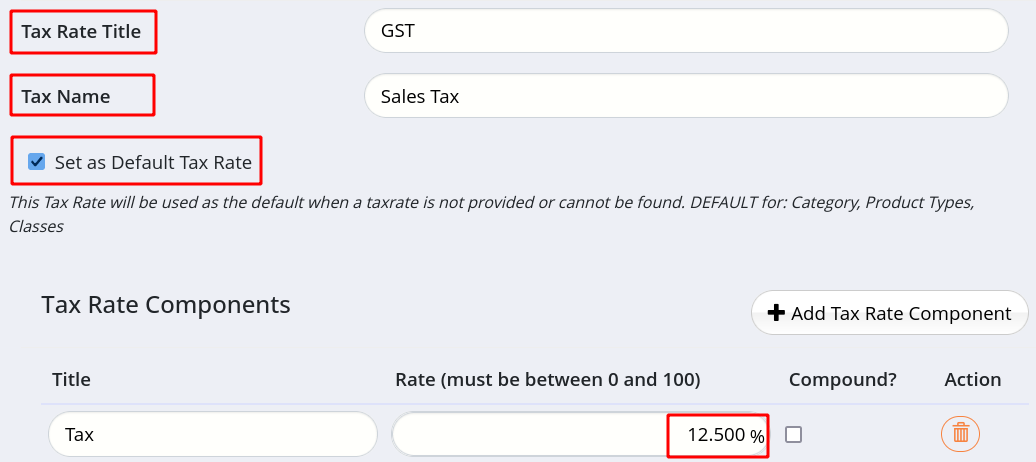
- Tax Rate Title - use this as a reference within GymMaster (e.g., Booking Tax, Product Tax)
- Tax Rate Name - this appears on receipts and invoices as a reference for your members
- Set as Default - select to have this tax rate pre-selected in sales and services (can be adjusted per sale/service)
- Tax Rate Components - determine the applicable tax percentage based on local requirements
- Most tax rates have a single component, but some regions may have multiple components
In example, we have created GST tax rate, a default Sales Tax applied to most products and services.
The tax rate is set at 12.5%.
Next - Apply Tax Rates

 2026 © Treshna Enterprises Ltd.
